



Kyro is a portfolio tracker and investment research platform that brings your investments, research, alerts, and AI tools into one workspace.
You can track stocks, ETFs, crypto, and cash manually or by CSV. Premium users can also connect more than 400 brokers, exchanges, and wallets.
What makes Kyro different is everything built around the portfolio. You get 30+ years of market data, company financials, SEC filings, insider transactions, analyst ratings, screeners, news, and portfolio-aware AI with access to more than 100 models.
We tested the free plan and 7-day Premium trial, connecting a live brokerage account and crypto wallet to see how well it works in practice.
Our expert panel has 60+ years of combined experience across stocks, crypto, forex, and commodities. Every platform is tested hands-on: we open a real account, deposit funds, explore the features, contact customer support, and withdraw, before writing a word.
Each service is then scored across 8 categories (cost, reliability, user experience, deposits & withdrawals, investing options, market range, research tools, and educational resources) to produce a star rating out of 5. Our editorial content is independent and never influenced by advertisers or commercial relationships.
Read our review methodology and editorial guidelines.
What's our quick verdict on Kyro?
Kyro scores 4.8 out of 5. It combines automatic account syncing, strong investment research, and genuinely useful portfolio-aware AI for $12 a month. The main drawbacks are the lack of a native mobile app, limited risk analytics, and no automatic account syncing on the free plan.
| Key information | Details |
|---|---|
| Overall rating | 4.8 / 5 |
| Best for | Investors managing several accounts who want tracking, research, and AI in one place |
| Starting price | Free; Premium $12/month |
| Free plan? | Yes |
| Mobile app? | No, web-based only |
| Account syncing? | Premium only, up to 5 accounts |
| Standout feature | Portfolio-aware AI across 100+ models |
| Main limitation | No native mobile app or free account syncing |
Kyro pros and cons
Kyro is strongest if your investments are spread across several brokers or wallets. Its account syncing, research tools, and portfolio-aware AI work well together.
The biggest compromises are the missing mobile app and the fact that most of its best portfolio features require Premium.
Key features
Kyro tracks stocks, ETFs, crypto, and cash, with up to 10 portfolios on Premium. Paying users can automatically sync five accounts from more than 400 supported brokers, exchanges, and wallets. Research, watchlists, screening, alerts, and some AI features are also available without paying.
| Feature | Kyro |
|---|---|
| Free plan | Yes |
| Premium | $12/month with 7-day trial |
| Portfolio assets | Stocks, ETFs, crypto, cash |
| Research coverage | Also includes indices, commodities, FX, and options |
| Account integrations | 400+ |
| Connected accounts | Up to 5 on Premium |
| Manual entry | Yes |
| CSV import | Yes |
| Automatic syncing | Premium only |
| Portfolios | 1 Free, 10 Premium |
| Watchlists | Unlimited |
| Activity history | 100 entries per portfolio on Free, unlimited on Premium |
| Dividend tracking | Yes |
| Research | Financials, SEC filings, insider activity, analyst data |
| AI | KyroAI on Free, 100+ models and agents on Premium |
| Mobile app | No |
| Tax reporting | No |
How did we test Kyro?
We opened a free Kyro account in August 2026 and activated the 7-day Premium trial to test broker syncing, wallet connections, AI tools, and the higher portfolio limits.
After connecting one live brokerage account and one crypto wallet, our holdings, balances, and transaction history synced automatically without any manual re-entry.
From there, we explored the individual stock research pages, financial statements, filings, analyst data, Kyro Score, screeners, alerts, and KyroAI. We also asked KyroAI questions specifically about our connected portfolio to see how useful it was with real account data.
The one area we didn’t test extensively was the always-on AI agents, so our assessment of that feature is partly based on Kyro’s published functionality. We also haven’t used the platform through a full market cycle or tested every one of its 400+ supported institutions.

Who is Kyro best for?
Kyro is best for investors with money spread across several brokers, exchanges, or crypto wallets. It is particularly useful if you want portfolio tracking and investment research in the same place, rather than maintaining a spreadsheet alongside separate broker and research apps.
The biggest advantage is account aggregation. A Robinhood account, Coinbase wallet, Interactive Brokers account, and other supported accounts can all feed into separate Kyro portfolios automatically.
It also suits investors who regularly use AI for research. KyroAI already has context about your portfolio, so you don’t need to explain your holdings every time you ask a question.
Kyro is less suitable if you mainly need:
- Detailed tax reports
- Dividend forecasting
- Formal portfolio risk metrics
- Property or pension tracking
- A native mobile app
What can Kyro's AI actually do?
Kyro's AI can analyse your portfolio, answer questions about your holdings, and monitor accounts for conditions you specify. Premium gives you access to more than 100 AI models, while its agents can run in the background and alert you when something relevant changes.
The main advantage is context.
Ask a general AI chatbot about technology stocks and it only knows what you tell it. KyroAI already knows which technology stocks you own, how large those positions are, and how they fit into the rest of your portfolio.
You can also switch between models such as ChatGPT, Claude, Gemini, Grok, and DeepSeek within the platform.
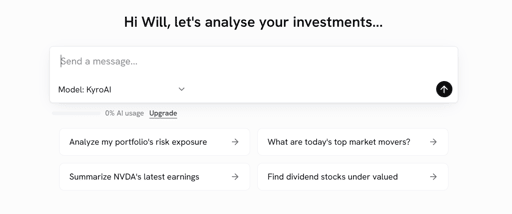
Its agents take this further. You could ask Kyro to flag an analyst upgrade, warn you when crypto exceeds a certain percentage of your portfolio, or highlight a potential rebalance.
These agents cannot execute trades or move money. Kyro's broker connections are read-only.
Core KyroAI access is free. Premium adds the full model selection and always-on agents.
How much does Kyro cost?
Kyro has two plans: Free at $0/month and Premium at $12/month. Premium comes with a 7-day free trial and adds automatic account syncing, unlimited activity history, more portfolios, the full AI model selection, and always-on agents.
| Free | Premium | |
|---|---|---|
| Price | $0 | $12/month |
| Portfolios | 1 | Up to 10 |
| Watchlists | Unlimited | Unlimited |
| Activity history | 100 per portfolio | Unlimited |
| Broker/wallet syncing | No | Up to 5 accounts |
| AI | Core KyroAI | 100+ models |
| AI agents | No | Yes |
| Alerts | Limited | Unlimited active rules |
| Research | Included | Included |
Kyro's free plan
The free plan gives you one portfolio, unlimited watchlists, core screening, basic KyroAI access, and up to 100 recorded activities.
You can enter holdings manually or upload them by CSV, but you can't connect a brokerage account.
Importantly, Kyro doesn't put its core market research behind the paywall. Financial data, filings, analyst information, and other research tools remain available for free.
Kyro Premium
Premium is where Kyro becomes much more useful as a portfolio tracker.
For $12/month, you can connect up to five brokers, exchanges, or wallets, create up to 10 portfolios, import full transaction histories, and use the complete AI offering.
If you have several investment accounts, Premium is the plan that makes the most sense.
Is Kyro worth paying for?
Kyro Premium is worth considering if you manage investments across several accounts. The $12 monthly fee gives you automatic syncing for five brokers, exchanges, or wallets, along with unlimited activity history, more portfolios, and the full AI feature set.
The free plan is enough if you only want to test Kyro or manually track a simple portfolio.
Once you have several accounts, manual tracking becomes less appealing. That's where Premium provides most of its value.
It won't replace specialist tax software or a full net-worth tracker, however. If either is important to you, you'll still need another tool.
How does portfolio tracking work in Kyro?
Kyro lets you build a portfolio manually, upload transactions by CSV, or connect a supported account on Premium. Connected accounts sync holdings, balances, and transaction history automatically in the background.
Creating a portfolio only takes a few minutes.
When connecting an account, you assign it to a specific portfolio. This is useful if you want to separate different strategies, brokers, or account types rather than putting everything into one view.
The Activity page acts as a searchable transaction ledger covering buys, sells, deposits, and withdrawals. Transactions can also include custom fees and notes.
Free accounts are limited to 100 historical activities per portfolio. Premium removes the limit.
Which brokers and wallets does Kyro support?
Kyro supports 400+ brokers, exchanges, and Web3 wallets, including Robinhood, Coinbase, Interactive Brokers, and MetaMask. Connections are encrypted and read-only, meaning Kyro can retrieve account information but cannot trade or withdraw money.
Automatic syncing requires Premium and supports up to five connected accounts.
Syncing happens in the background when account changes occur rather than operating as a continuously updating market feed.
If your broker isn't supported, you can still use manual entry or CSV uploads.
It's worth checking Kyro's latest integrations list before paying if a particular broker or wallet is essential to you.
What investments can you track in Kyro?
Kyro lets you track stocks, ETFs, crypto, and cash directly inside a portfolio. Its wider research, screening, and alert tools also cover indices, commodities, currencies, and options.
That makes Kyro reasonably broad for investors mixing traditional investments with crypto.
It isn't designed as a complete net-worth tracker, however. You can't currently add:
- Bonds
- Mutual funds
- Property
- Private investments
- Physical commodities
- Pensions or retirement accounts
Anyone wanting their entire financial life in one dashboard will therefore need another tool.
How good is Kyro's portfolio analysis?
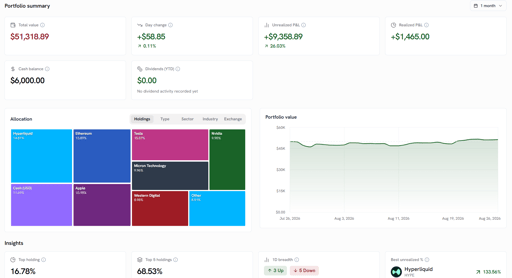
Kyro provides good everyday portfolio analysis, particularly for performance, allocation, and concentration. Its visual treemaps make it easy to see where your money is invested, but advanced users may miss formal risk measures such as beta, volatility, Sharpe ratio, and maximum drawdown.
The dashboard shows portfolio value, daily P&L, cash balance, realised gains, and unrealised gains.
It also highlights your strongest and weakest positions and includes a portfolio value chart covering one week, one month, six months, or one year.
Kyro doesn’t specify whether its return calculations use time-weighted, money-weighted, or annualised methodology. It also doesn’t currently offer a named benchmark comparison feature.
Kyro’s treemaps are one of the better parts of the portfolio dashboard.
You can break holdings down by:
- Individual asset
- Asset type
- Sector
- Industry
- Exchange
The platform also highlights concentration and daily market breadth across your holdings.
There’s no portfolio-overlap tool, so Kyro won’t tell you how much two ETFs overlap underneath the surface.
Risk analysis is relatively light.
Kyro doesn’t currently provide volatility, beta, Sharpe ratio, maximum drawdown, or a dedicated risk score.
Its AI agents can identify concentration or suggest a rebalance based on rules you define, but the platform won’t make the trades for you.
Does Kyro track dividends?
Yes. Kyro automatically tracks year-to-date dividend income and previous dividend payments inside your portfolio. Connected accounts require no separate dividend setup.
For basic income tracking, it does the job well.
It doesn't currently provide more advanced dividend tools such as:
- Yield on cost
- Dividend growth history
- Forward income forecasts
- Dividend calendars
- Dedicated dividend reinvestment tracking
Investors building a portfolio primarily around income may therefore prefer a specialist dividend tracker.
What research tools does Kyro include?
Kyro includes a surprisingly broad set of research tools for a portfolio tracker. Financial statements, SEC filings, insider transactions, analyst ratings, historical data, screeners, watchlists, alerts, and the proprietary Kyro Score are all built into the same workspace.
Individual company pages include quarterly and annual financial statements alongside SEC filings such as:
- 8-K
- 10-Q
- 10-K
- 13F-HR
- Form 4
Insider transactions taken from Form 3 and Form 4 filings can also be viewed alongside share-price movements.
You get analyst ratings, price targets, and more than 30 years of historical market data.
These core research tools are available on the free plan.
Kyro also produces a proprietary Kyro Score, which combines technical signals, analyst consensus, financial ratios, and insider activity into an overall bullish or bearish rating.
Kyro doesn’t publish the exact weighting behind the score, so we would treat it as a useful starting point rather than a standalone investment signal.
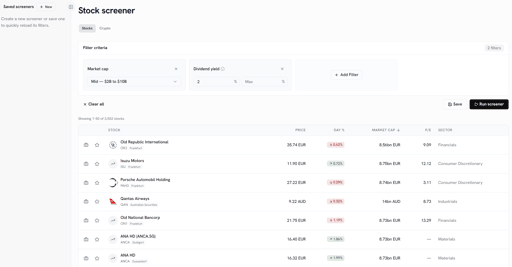
Kyro’s screener covers equities, funds, and crypto using criteria such as market capitalisation, price, volume, sector, fundamentals, and technical indicators.
Core screening is free.
Premium adds unlimited saved screeners, alerts when new investments match your criteria, and CSV exports.
Dedicated screening platforms still offer more granular filters, but Kyro’s version is good enough for most everyday research.
Watchlists are unlimited on every plan and can include stocks, ETFs, crypto, and FX.
Alerts are more flexible than simple price notifications because you can write conditions in natural language.
For example:
- “Tell me when AAPL falls 3%”
- “Alert me if crypto exceeds 40% of my portfolio”
- “Tell me if my portfolio falls 5%”
You can also add quiet hours and cooldown periods to avoid too many notifications.
Kyro includes interactive price charts within its research pages.
It doesn’t currently offer financial planning tools such as retirement calculators, compound-interest calculators, or portfolio simulators.
Does Kyro handle tax reporting?
No. Kyro doesn't provide dedicated capital gains reports, tax-lot reporting, tax returns, or accountant-ready tax exports. Its transaction ledger can help with cost-basis records, but it isn't intended to replace specialist portfolio tax software.
You can add custom fees and notes to individual transactions, which is useful when keeping accurate records.
For actual tax filing, however, you'll need your broker's documentation or another platform such as Sharesight or dedicated tax software.
Is Kyro easy to use?
Yes. Kyro is easy to get started with, particularly given how much information it fits into the platform. Creating a portfolio and connecting an account only takes a few minutes, and the interface stays relatively uncluttered.
The design is clean and minimal. Core tasks such as checking holdings, viewing alerts, or asking KyroAI about your portfolio are straightforward.
There's more of a learning curve once you start using screeners, detailed research pages, and AI agent rules, but you don't need those features to use the basic tracker effectively.
Does Kyro have a mobile app?
No. Kyro currently has no dedicated iOS or Android app. You can access the platform through a mobile browser, and the interface works reasonably well on a phone, but it isn't the same as having a native app.
This is one of Kyro's clearest weaknesses.
If you mainly track investments from your phone, competitors with dedicated mobile apps may be a better fit.
Is Kyro's data accurate?
Our connected brokerage account synced correctly during testing. Holdings and recent transactions appeared as expected, and we didn't encounter duplicate transactions, missing data, or obvious balance errors.
That result should be kept in context.
We only tested one brokerage account over a relatively short period. We haven't verified all 400+ integrations or tested how every provider handles corporate actions, currency conversions, and dividend reinvestment.
Kyro is also relatively new, so it doesn't yet have the same volume of independent user feedback as long-established portfolio trackers.
Our experience was positive, but it isn't enough to guarantee accuracy across every account.
Is Kyro safe to connect your accounts to?
Kyro uses read-only account connections, which means it can retrieve investment data but cannot place trades or withdraw money from connected accounts. This limits what the connection itself can do and is an important safeguard for a portfolio tracker.
The same restriction applies to Kyro's AI agents.
They can analyse holdings, monitor accounts, and make suggestions, but they cannot execute a trade or move your money.
Kyro also states that connections are encrypted and that it doesn't directly store brokerage login credentials.
Its public feature pages provide less detail about areas such as encryption standards, two-factor authentication requirements, data deletion, and data-sharing policies. We'd recommend checking the latest privacy policy and terms before connecting financial accounts.
What is Kyro's customer support like?
Kyro provides support through email and its help centre, with no published telephone support number. As a newer platform, its support operation is smaller than those of some long-established investment services.
We didn't run a structured response-time test, so we can't reliably rate how quickly the team handles support requests.
If fast or telephone-based support is important to you, this is worth checking before subscribing.
How does Kyro compare to Sharesight, TIKR, and Simply Wall St?
Kyro sits somewhere between a portfolio tracker and an investment research platform.
Sharesight is stronger for tax and performance reporting, TIKR offers deeper stock research, and Simply Wall St has stronger mobile and visual analysis tools. Kyro's advantage is combining account syncing, crypto support, research, and portfolio-aware AI for $12/month.
| Kyro | Sharesight | TIKR | Simply Wall St | |
|---|---|---|---|---|
| Starting price | Free; $12/mo Premium | Free; paid from ~$7/mo | Free; Plus $24.95/mo | Free; paid from ~$10.95/mo |
| Account syncing | Yes, Premium | Limited | No | Yes on paid plans |
| Main tracked assets | Stocks, ETFs, crypto, cash | Stocks, ETFs, funds | Stocks | Stocks, ETFs, some crypto |
| Research | Strong | Limited | Very strong | Strong |
| Dividend tools | Good | Excellent | Limited | Basic |
| AI | 100+ models and agents | No | No | Limited |
| Tax reporting | No | Strong | No | Limited |
| Mobile app | No | Yes | No | Yes |
| Best for | Tracking + research + AI | Tax and dividends | Deep stock research | Visual stock analysis |
Kyro vs Sharesight
Sharesight is the stronger choice for investors who need detailed tax and performance reporting. That's its speciality, and Kyro doesn't currently compete with it there.
Kyro offers more research, native crypto tracking, and far stronger AI tools.
Sharesight's entry-level paid plan is cheaper, but its portfolio and holding limits mean investors needing more advanced reporting may need a higher tier.
Choose Sharesight for tax and dividend reporting. Choose Kyro for account aggregation, research, crypto, and AI.
Kyro vs TIKR
TIKR is primarily a stock research platform rather than a portfolio tracker.
It covers more than 100,000 stocks across 92 countries and provides up to 30 years of financial history, analyst estimates, and earnings-call transcripts.
Kyro offers less research depth but adds brokerage syncing, crypto tracking, portfolio analytics, and AI.
TIKR Pro costs considerably more at $54.95/month, compared with $12/month for Kyro Premium.
Choose TIKR for deep global equity research. Choose Kyro if you want your actual portfolio connected to your research tools.
Kyro vs Simply Wall St
Simply Wall St focuses heavily on visual company analysis through its Snowflake model and offers native mobile apps.
Kyro has no dedicated mobile app, but its AI offering is much broader and its portfolio tools cover stocks, ETFs, crypto, and cash.
Choose Simply Wall St for visual stock analysis and mobile access. Choose Kyro for multi-account tracking and portfolio-aware AI.
What are the best Kyro alternatives?
The best Kyro alternative depends on what you need most. Sharesight is stronger for tax and dividend reporting, TIKR offers deeper global equity research, while Simply Wall St, Getquin, and Delta all provide mobile apps that Kyro currently lacks.
- Sharesight makes sense if tax reporting is your priority.
- TIKR is better if your main focus is deep company research rather than portfolio tracking.
- Simply Wall St suits investors who like visual stock analysis. Getquin adds more of a community element, while Delta is a simpler mobile-first tracker.
None is a direct replacement for everything Kyro does, so the best option comes down to which feature matters most.
Is Kyro worth it overall?
Yes, for the right investor. Kyro is particularly good for someone with investments spread across several brokers, exchanges, or wallets who wants portfolio tracking, research, alerts, and AI in one place.
That's why we rate it 4.8 out of 5.
There are still clear gaps. There's no native mobile app, no free account syncing, no proper tax reporting, and limited advanced risk analytics.
Kyro is also relatively new, so it doesn't yet have the long track record of platforms such as Sharesight.
The free plan is worth trying if you only need one manually managed portfolio. For multi-account investors, Premium is where Kyro becomes genuinely useful.
Choose Sharesight instead if tax reporting matters most, or TIKR if you want deeper stock research. If a native mobile app is essential, Kyro isn't the best option yet.
Frequently asked questions
Yes. Kyro has a free plan with one portfolio, unlimited watchlists, core screening, KyroAI access, and up to 100 recorded activities per portfolio. Automatic brokerage and wallet syncing requires Premium.
Kyro Premium costs $12/month and includes a 7-day free trial. It adds automatic account syncing, up to 10 portfolios, unlimited transaction history, 100+ AI models, and always-on agents.
Kyro uses encrypted, read-only account connections and states that it doesn’t store your brokerage login credentials directly. It cannot place trades or withdraw money from connected accounts.
Kyro supports more than 400 brokers, exchanges, and Web3 wallets, including Interactive Brokers, Robinhood, Coinbase, and MetaMask. Check Kyro’s current integrations list before subscribing if you rely on a specific provider.
Yes, on Premium. Kyro can automatically sync up to five brokerage, exchange, or wallet accounts. Free users need to enter holdings manually or import them by CSV.
Kyro portfolios support stocks, ETFs, crypto, and cash. Its research tools also cover indices, commodities, currencies, and options.
Yes. Kyro automatically tracks year-to-date dividend income and past distributions. It doesn’t currently provide advanced dividend forecasting or yield-on-cost analysis.
Our connected brokerage account synced correctly during testing, with no obvious missing or duplicated transactions. We only tested one account over a limited period, so this shouldn’t be taken as proof that every integration will perform identically.
How do we test and score portfolio trackers?
We test portfolio trackers using the same core criteria, including account setup, portfolio imports, broker integrations, performance tracking, research, usability, pricing, security, and reporting. We also compare synced data against source accounts and clearly state where our testing is limited.
What we test
Our testing covers:
- Account setup and portfolio creation
- Manual and CSV imports
- Brokerage and wallet integrations
- Portfolio performance and analytics
- Investment research tools
- Data accuracy
- Alerts and automation
- Mobile experience
- Export and reporting features
- Customer support
- Pricing and overall value
New platforms are assessed using the same framework as established ones, while taking their shorter operating history into account.
How we score portfolio trackers
Our overall score considers portfolio tracking, account integrations, asset coverage, analytics, accuracy, research tools, ease of use, security, pricing, and customer support.
We weight the features that matter most to someone actually using the platform rather than scoring products purely on the number of features they advertise.